Apple MacBook Air (M2, 2022)
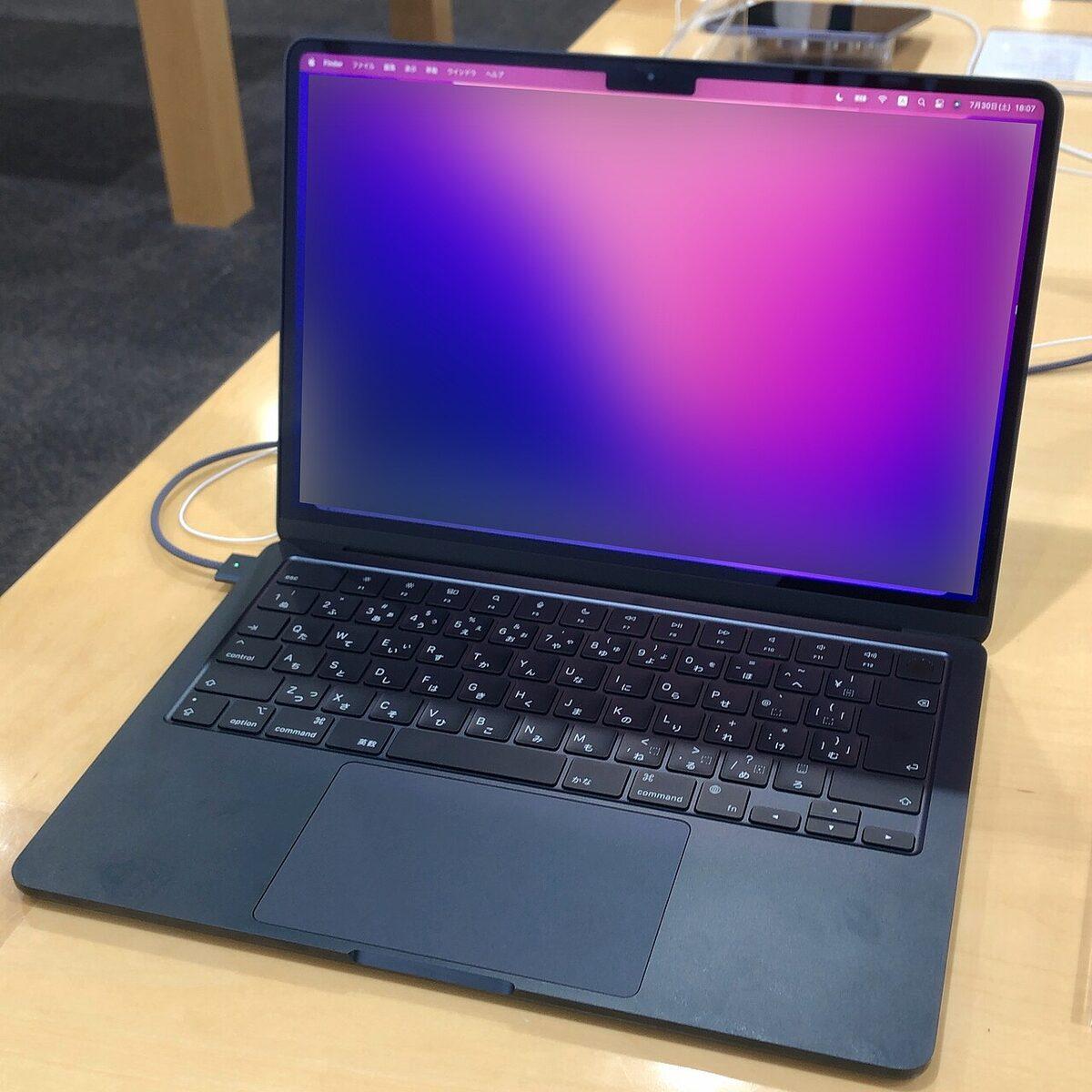
The 2022 MacBook Air with M2 brought a flatter redesign, a brighter 13.6-inch screen with a notch, a 1080p webcam and the return of MagSafe charging. It suits students and professionals who want a light, silent Mac and can live with one external display.
Common configurations
- Launched
- 2022
- Processor
- Apple M2
- GPU
- Integrated
- RAM
- 8GB, 16GB, 24GB
- Storage
- 256GB, 512GB, 1TB, 2TB
Filled dots are the options this model came in; open dots are other sizes found elsewhere in our catalogue.
52 models, coloured by type. The year is the model's launch year in our catalogue.
Good for
- Students and office users who want a thin, fanless Mac with all-day battery
- Video callers who want a better webcam than the M1 Air's 720p camera
- Writers, coders and light photo editors
- People who like MagSafe so a tripped cable does not pull the laptop off the table
Not ideal for
- Gamers, since Boot Camp is not available and many Windows games do not run
- Anyone who needs two external monitors without a special dock
- Heavy, long video renders, where the fanless design throttles
- Buyers who mainly want value; a used M1 Air does most of the same work
Strengths
- 500-nit 13.6-inch Liquid Retina display; Notebookcheck measured about 98% P3 coverage and found no PWM flicker
- 1080p FaceTime HD camera
- MagSafe 3 charging, which frees both Thunderbolt / USB 4 ports
- Silent fanless design
- Light at about 1.24 kg, with a strong build and excellent trackpad
- Available with up to 24GB of unified memory
Weaknesses
- The base 256GB model uses a single NAND chip, so its SSD benchmarks slower than the 512GB model and the old 256GB M1 Air
- Only one external display is supported
- Throttles under sustained load; Notebookcheck saw multi-core performance drop by about 30% in a long Cinebench loop
- The central notch cuts into the top of the screen; macOS uses the area beside it for the menu bar
- RAM is onboard and cannot be upgraded later
Which configuration to choose
If you can, pick 512GB storage. It avoids the slower single-chip SSD of the base model and leaves room for files, since storage cannot be upgraded. 16GB of RAM is worth having if you keep many apps open or plan to keep the laptop for years; 8GB is fine for light study and office work. The 10-core GPU adds a little graphics power, but the Air has no fan, so sustained load still makes it throttle (Notebookcheck saw about 30% lower multi-core performance in a long loop on the 8-core GPU model). The 8-core GPU model came with a 30W charger and the 10-core GPU / 512GB model with a 35W dual-port charger, and a 70W adapter allows fast charging.
Buying one used? Check these
- Make sure Find My Mac is off and the seller has signed out of their Apple Account. After the seller erases it, setup must not show an Activation Lock screen. If it does, walk away
- Check cycle count in System Information > Power (Apple rates it for 1000 cycles) and Battery Health in System Settings
- Confirm storage size: a 256GB unit has the slower single-chip SSD. Also confirm RAM (8, 16 or 24GB) and whether it has the 8-core or 10-core GPU
- Test the MagSafe port and both USB-C ports for charging, and check the MagSafe cable for fraying
- Look closely at the edges and corners for dents, and on Midnight units for scratches that the seller's photos may hide
- Check the display for pressure marks, dead pixels and backlight bleed on a dark background
- Match the serial number in About This Mac with the one under the laptop, and check it on Apple's coverage page
Ask us where to buy this laptop
Selling an Apple MacBook Air (M2, 2022)? See what it's worth
Common questions
Is the 256GB MacBook Air M2 SSD really slower?
Yes, in benchmarks. Apple moved the 256GB model to a single NAND chip, while 512GB and larger models use more than one chip and can read and write in parallel. For everyday study and office work most people will not notice, but large file copies and heavy swapping on an 8GB unit are slower.
Should I buy a used M1 Air or M2 Air?
The M2 Air has a brighter, larger screen, a 1080p webcam and MagSafe, and it is a little faster. The M1 Air is the older model and still handles the same kinds of tasks. If the webcam and screen matter to you, choose the M2; if price matters most, a healthy M1 is good value.
Can the MacBook Air M2 run Windows games?
Not well. There is no Boot Camp on Apple silicon. Windows 11 for Arm can run in Parallels Desktop, but Microsoft warns that some games and apps, especially those that rely on DirectX 12, may not work.
How do I check the battery health of a used M2 Air?
Hold the Option key, open the Apple menu and choose System Information, then Power, to see the cycle count. Apple rates this battery to keep up to 80% of its original capacity at 1000 cycles. Battery Health in System Settings also shows the maximum capacity.
Related guides
- Laptop Docks and Monitors: USB-C, Thunderbolt and Mac Limits
- Choosing a Laptop for University in Malaysia
- Laptops for Small Offices: An SME Buyer's Guide
- Sell or Upgrade Your Old Laptop? How to Decide
Compare with
- Apple MacBook Air (M2, 2022) vs Apple MacBook Air (M1, 2020)
- Apple MacBook Air (M2, 2022) vs Apple MacBook Air (M4, 2025)
- Apple MacBook Air (M2, 2022) vs Apple MacBook Pro 14-inch (M1 Pro, 2021)
Sources · Updated 2026-11-23
- support.apple.com/en-us/111867
- support.apple.com/en-us/102888
- support.apple.com/en-us/102541
- notebookcheck.net/Apple-MacBook-Air-M2-Entry-Review-A-very-good-but-too-expensiv
- macrumors.com/2022/07/14/m2-macbook-air-slower-ssd-base-model
- support.microsoft.com/en-us/windows/options-for-using-windows-11-with-mac-comput
- support.apple.com/en-us/102622